Skip to content

Works with Claude, ChatGPT and Codex · free and open source

Stop rewriting your resume
for every job.

Maestro tailors it from your whole career history in under a minute, and every bullet is something you actually did. So when an interviewer asks about one, you already have the story.

Two commands to install on macOS, Linux and Windows. No account.

A short animation made from real captures of the app. The person, the employers and the job are made up.

The premise

Your best bullet is stuck in last month's copy.

One job asks for “data pipelines”, so you copy the file and change a few lines. The next wants “stakeholder communication”, so you copy again. Somewhere in the third copy an AI “makes it stronger” and rewrites a bullet you spent an evening getting right. Six applications later you have six resumes, and no idea which one still says what you meant.

Every tool I tried made a fresh document for every job, and documents drift. The AI ones drift faster, because every pass rephrases a bit more of you out of it.

Maestro pulls apart what you've been keeping in one file. What you did lives in one career history. What this employer should notice becomes a specialist resume, matched to the job in under a minute, with every change shown as a diff you accept or undo, like reviewing code. How it looks is a template, so a new look never touches a fact.

Your time should go into your career, not into maintaining copies of a document about your career.

Works with your AI

Give your AI your career.

Connect Claude, Codex or the ChatGPT desktop app, and your assistant gets 88 tools on your career history, your resumes and your jobs. Then you just ask.

  1. Extract

    Get the facts out of postings and old files.

    • You ask: “Here's a posting. Should I even apply?”

      It saves the job, scores your resumes against it, and flags knock-outs like visa or years of experience.

    • You ask: “Turn my old resumes and review notes into my career history.”

      Every bullet and note becomes a draft you approve.

  2. Maintain

    Keep your career history and resumes current.

    • You ask: “I shipped the fraud model this quarter. Add it.”

      A new bullet in your career history, as a draft you approve. Every resume can use it.

    • You ask: “Make me a resume for fintech ML roles in the UK.”

      A specialist resume built from your history, targeted to that role and country.

    • You ask: “Is my resume ready to send?”

      A grade and a fix list, ranked by what each flaw costs you.

  3. Hunt

    Find roles that fit while you do something else.

    • You ask: “Every morning, find new ML roles that fit and file the good ones.”

      The job-hunt skill files them to your Agent inbox. You queue or skip each one.

    • You ask: “Which skills keep showing up that I don't have?”

      The gaps across every job you saved, most frequent first.

  4. Apply

    Go from a saved job to a finished application.

    • You ask: “Tailor this one, walk me through the gaps, then make the PDF.”

      It asks about each gap instead of inventing, keeps every change as a diff you can undo, and renders the PDF.

    • You ask: “Answer these screening questions and write a short cover letter.”

      Both drafted from your own record.

    • You ask: “Fill the applications I queued. Show me each one before it goes.”

      The apply-session skill fills them in a browser. Nothing is submitted without your yes, unless you turn on full automation.

    • You ask: “Did I hear back from anyone?”

      If your assistant can read your mail, the mail-status skill moves each job to applied, interviewing, rejected or offered.

Connect it once

bash
maestro connect

Adds Maestro to Claude Desktop, Claude Code, Codex, Cursor or VS Code. No config file to write by hand.

Ask in your own words. These are only a start.

By default, an apply run waits for your yes before each submit. Full automation is opt-in and off by default: when you turn it on, your own agent may submit the jobs you queued whose final review is clean, within your daily limit. It also turns on the Companion's Apply, which fills the application page by page and leaves Submit to you.

How it works

One record in. A matched resume out.

Step 1

One career history

Drop in every resume you own. Maestro merges them into one record of what you actually did.

Step 2

A specialist resume for every role, company and country

One base resume per track, each with a Target: the role, a company, the countries it may go to.

Step 3

Matched to the job, every change a diff you accept or undo

Save the job, answer the gaps, tailor. Each edit shows as a diff you keep or undo.

What you get

From the first import to the Submit button.

Real captures from the app. Each one has the longer story on GitHub.

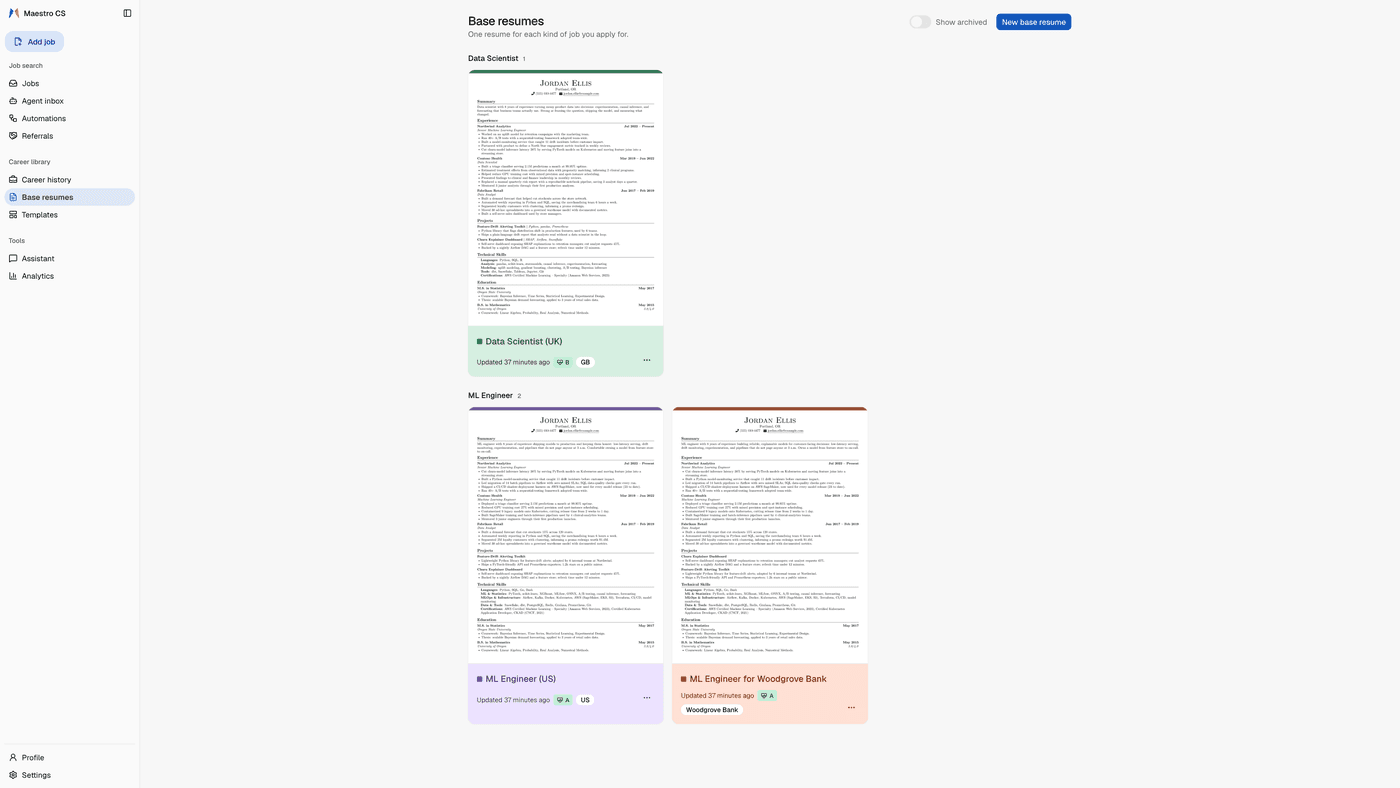
Three base resumes in the app, grouped by role, each card in its own colour with a page preview, a health grade and its Target pill: Data Scientist (UK) for GB, ML Engineer (US) for the US, and ML Engineer for Woodgrove Bank
Targets

A specialist resume for each track

Keep one base resume per kind of role you go after. Give each a Target: the role, a company, the countries it may go to. A resume set for other countries isn't scored or recommended for a job somewhere else.
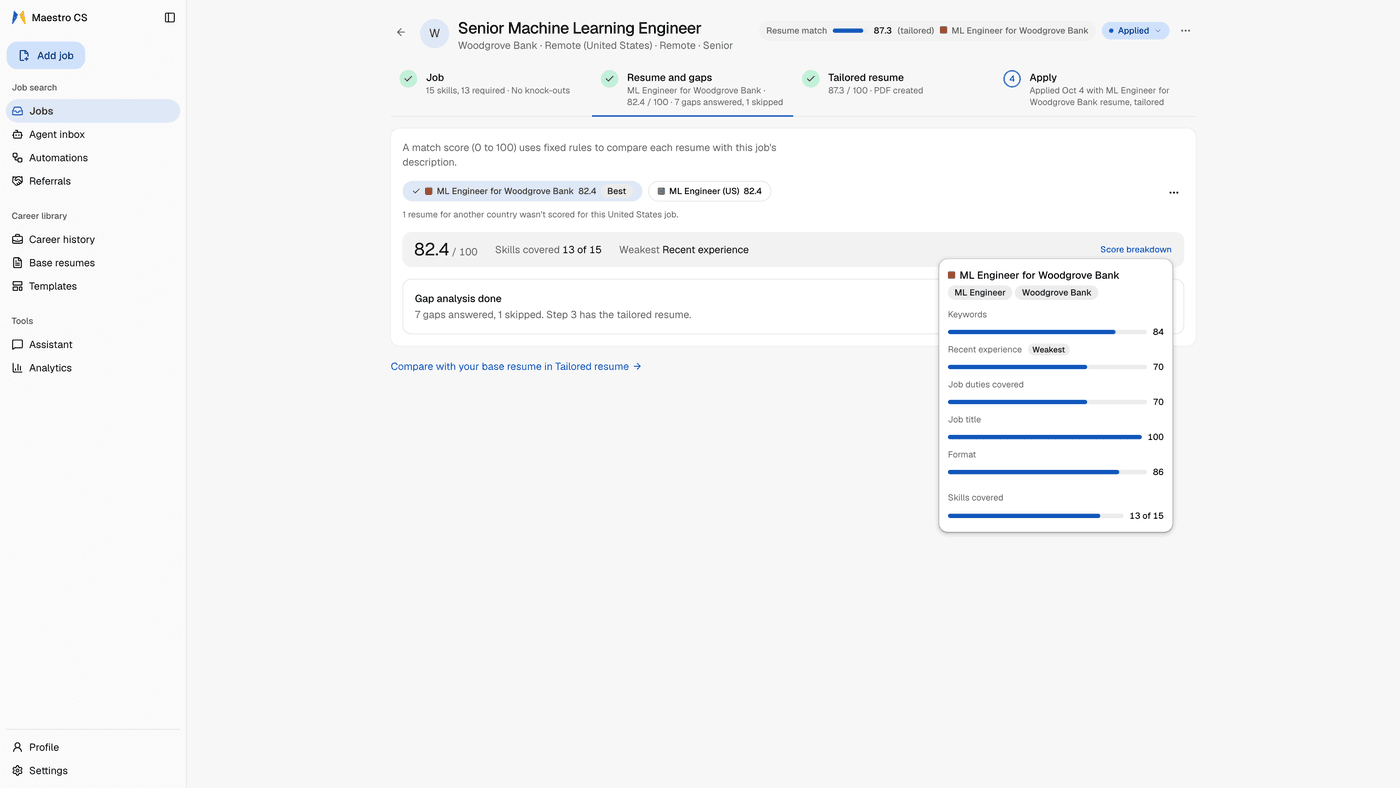
A saved job's page with its four numbered steps, Job, Resume and gaps, Tailored resume and Apply, open on Resume and gaps: two base resumes as chips, both at 82.4, a note that one resume for another country wasn't scored, the Score breakdown open with five subscores and skills covered, and a Gap analysis done card: 7 gaps answered, 1 skipped
Match score

It asks instead of inventing

Every job is scored against your base resumes when you save it. The Match score shows what a job wants that your resume doesn't show yet. Maestro asks you about each gap. If it's true, it's saved for every future application. If it isn't, it stays a gap.

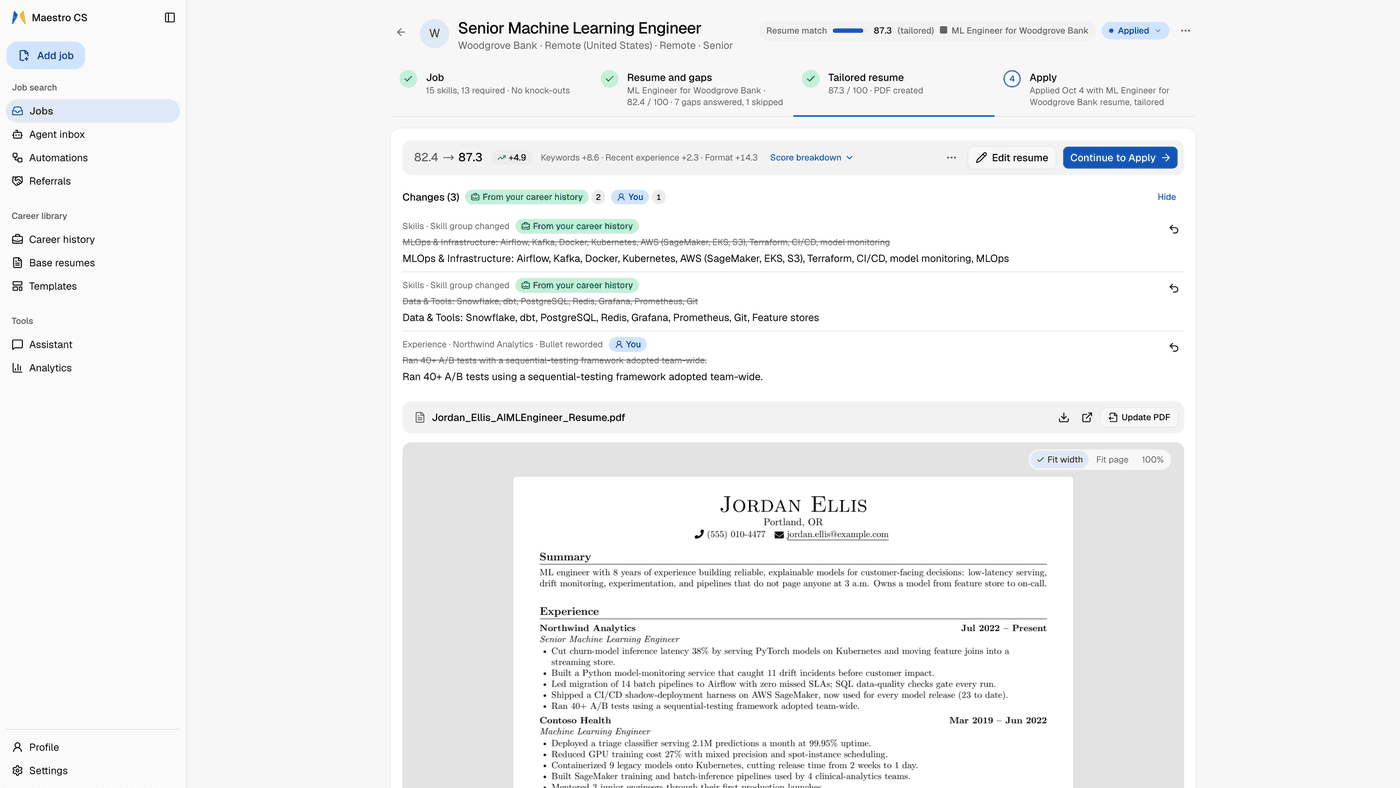
The same job's Tailored resume step: the Match score going from 82.4 to 87.3, three changes from the base resume, each shown struck through and rewritten with a Revert button and marked From your career history or You, then the PDF and its one-page preview
Diffs

Every AI edit is a diff

Every change arrives as a diff, line by line, the way a developer reviews a code change before accepting it. Accept it or undo it.

The AI fills in emphasis. It doesn't invent a new person.

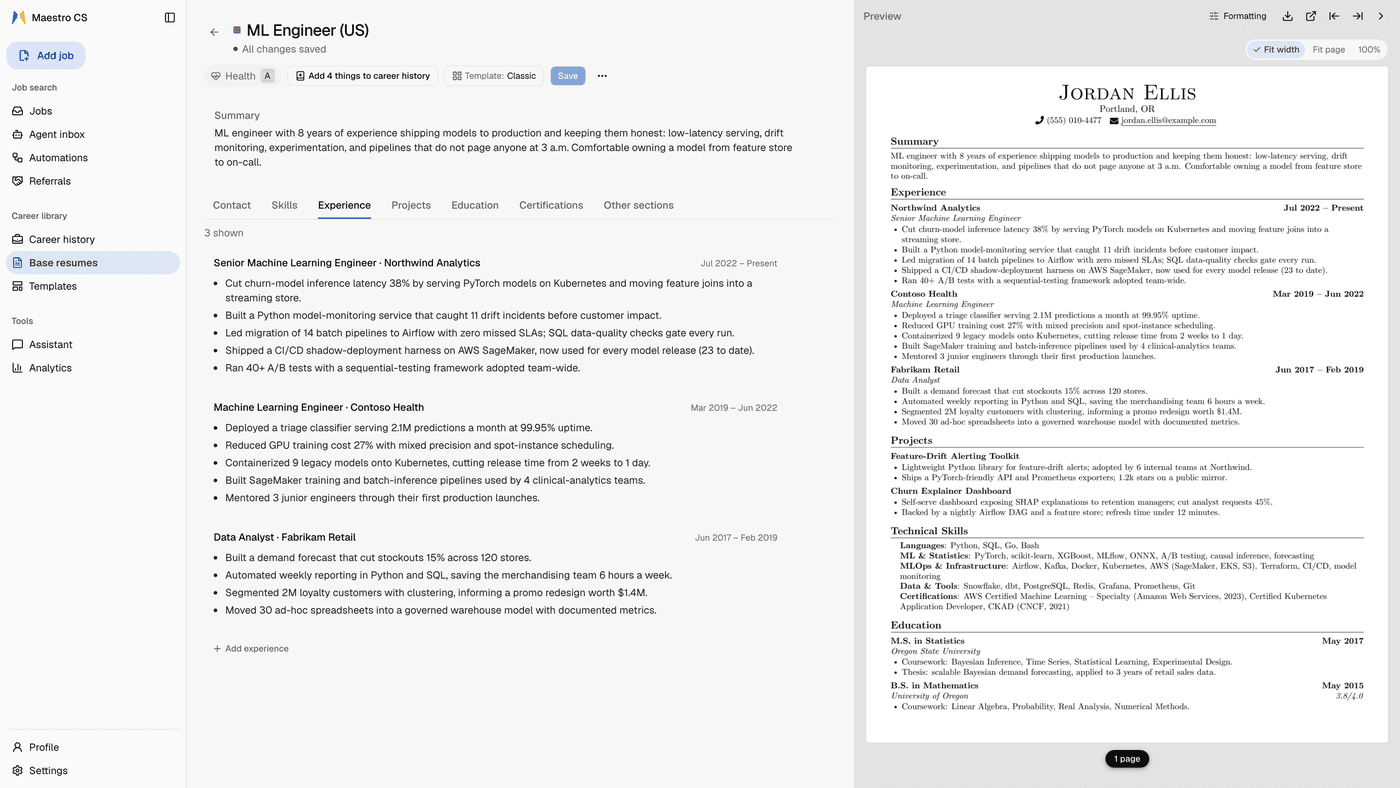
A base resume in the app, ML Engineer (US), with its colour square, health grade A and Template control in the toolbar, and the full one-page PDF preview beside the editor
Templates

How many resume templates have you changed in your life?

One or two. Here it's a button. LaTeX and Typst PDFs are built on your computer, and Typst needs no TeX.

Template change is not a decision of life anymore.

The Companion beside a made-up employer's careers page: Add job saves and scores the job, a resume is picked, and Apply tailors it, fills two pages of the application, clicks Next after each, and stops on the review page with Ready to submit. The cursor rests on Submit application, which is never pressed
The Companion

It fills the form. You press Submit.

A Chrome side panel saves the job from the board you're on, picks your best-matching resume and fills the page you're on from your saved answers. Then it stops. Turn on full automation and Apply takes the job through its application: it fills a page, clicks Next, and stops on the review page. Submit is always your click.

The numbers

Three numbers you can check yourself.

Under a minute

to save a job and tailor your resume to it

About 10 seconds on Gemini and about 40 on the OpenAI default, in our tests.

About $0.01

per application on the OpenAI default

Under $0.03 on Gemini, and about $0.01 with Claude Haiku, in our tests.

Same score, every time

for the same resume and the same job

The Match score runs on fixed rules and a small model on your computer, with no AI service involved.

Questions

Before you install.

Recommended, yes. The parts that make Maestro fastest day to day run on it: in-app tailoring, the Companion's AI fill, cover letters and screening answers, building your career history, the Assistant. One key, OpenAI, Gemini or Claude, is a complete setup. Without one you still get scoring, PDFs and tracking, and if you drive it over MCP your assistant supplies the model.

Not to us. There is no Maestro server and no account, and Maestro listens on 127.0.0.1 out of the box. When you use an AI feature, the text it needs goes to the AI service you picked, with your key. If you connect an assistant over MCP, what its tools return goes to that assistant's provider. The first start downloads the scoring model from Hugging Face, and no resume text is sent. PRIVACY.md lists every place data can go.

By default it carries an application to the point of submission and stops. The Companion fills the page you're on and stops, and you press Submit. With a connected agent, an apply run waits for your yes before each submit, within a daily limit you set. Nothing is submitted from the web app, and a submit click that can't be verified is never retried. Full automation is opt-in, off by default in Settings › Connected agents, and it changes two things. Your own agent may submit queued jobs whose final review is clean. And the Companion's Apply takes one job through its application in the tab: it fills each page, clicks Next, signs in or makes an account on known application sites with the job-site login you saved, and stops on the review page. The Companion never presses Submit. When the confirmation page shows after your Submit, it marks the job applied.

No. It's our score: deterministic, versioned, reproducible. It doesn't predict what an employer's applicant tracking system shows them, and no consumer tool can. One caveat worth knowing: recency is part of the score and it is measured against today, so the same document can score slightly differently months apart as its work ages. Everything else holds still. Use it to compare your own drafts and to catch parsing and coverage problems.

Early, and the repo says so. It has had little testing on machines that aren't mine, and Windows is the least tested platform. KNOWN_ISSUES.md lists what's solid, what's rough and what's a deliberate limitation. If something breaks, a clear bug report is the most useful thing you can send.

The record is yours. Here, control is the whole point.

Your career has one history.
Your resume should too.

Two commands to install. Free and open source. Your career history lives on your computer, not in someone else's cloud. No account.

Watch the 37-second tour

Take it with you any time: your whole history exports to one career.md.

What leaves your computer, and when